


 Written by admin
It appears as though various Google TV boxes are now automatically uninstalling apps they consider “harmful.” Here’s how to fix this before it impacts you.
If you own a Google TV device, there’s a good chance you’ve used it to install apps and APKs from outside the official Play Store. That flexibility is one of the top reasons cord-cutters prefer Android/Google TV based systems.
Unlike Apple TV or Roku, these boxes have long allowed sideloading — giving users access to a wide range of free streaming options and tools not found in the app store. But that may be changing fast.
This new problem came to light through a Reddit post where one user shared that his Onn Google TV Box had automatically uninstalled the HD Streamz app. This is a popular Free IPTV app used by many for free live TV channels.
The system removed the app on its own and displayed a warning which claimed the app was uninstalled for the users’ security.
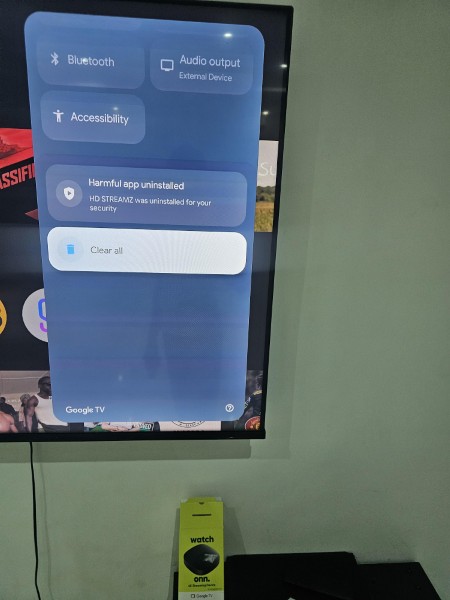
Other users jumped into the thread reporting the same thing had happened to them with Cricfy TV and several other streaming apps. Most of the apps affected are IPTV tools or APKs not approved by Google but widely used in the streaming community.
At the core of this problem is Google Play Protect — a security service that scans apps for malware and suspicious behavior. While it’s meant to help, it’s now flagging many third-party apps as dangerous without real cause.
In this case, it’s going further than just showing a warning. Play Protect is automatically removing apps behind the scenes, which is a major red flag for users who rely on sideloading.
If you’ve sideloaded any streaming apps on your device recently, you could be next.
This situation comes shortly after Amazon announced its own crackdown on third-party apps on Firestick and Fire TV. Apps such as FlixVision, FilmPlus, and more have all been flagged and blocked entirely from installation.
Amazon’s devices are now actively stopping installs of apps tied to piracy, even if those apps have legitimate use cases. It’s becoming clear that both companies are stepping up efforts to control what users can install on their devices.
The concern doesn’t stop there. Google has already confirmed that new restrictions for sideloading apps will arrive by 2026. These changes will limit how apps are installed outside the Play Store and tighten security around unverified APKs.
Put simply, Google wants to be the gatekeeper for all apps — even on devices you own. This latest move with Play Protect could be a trial run for what’s to come.
The good news? There’s a fix for this — at least for now. If your apps are being removed or flagged as harmful, you can disable Google Play Protect. This will stop the automatic scanning and uninstalling of sideloaded APKs.
Visit the full guide below for screenshots and details:
How to Disable Play Protect on Android/Google TV
Once disabled, your device should stop deleting your installed apps.
Your online activity is monitored by your ISP, app/addon/IPTV devs, government, and all websites.
🔒 Become anonymous while streaming & downloading with Surfshark VPN
Save 87% with 24-Month Plan + Get 3 FREE Months
Use on Unlimited Devices & Share 1 Account with Entire Family
CLAIM DEAL HERE
TROYPOINT Tip: You should always use a VPN when sideloading or streaming with third-party apps. A trusted VPN Service will keep your activity private and helps avoid ISP throttling or blocks.
These moves by Google and Amazon are part of a larger shift to limit what users can do with their devices. For years, sideloading has allowed cord-cutters to break free from overpriced streaming services and gain access to better tools. But now the major players are clamping down.
Whether it’s called security or anti-piracy, the result is the same — users are losing control.
We want to know what you think of the latest “crackdown” from Google by removing 3rd party apps from various devices. Drop a comment in the comment section below!
This page includes affiliate links where TROYPOINT may receive a commission at no extra cost to you. Many times, visitors will receive a discount due to the special arrangements made for our fans. Learn more on my Affiliate Disclaimer page.



© IPTVSub is Proudly Owned by win-design