


 Written by admin
This BuzzTV PowerStation 6 review will cover all important details regarding these powerful Android TV boxes. BuzzTV provided me with both their Unlimited and 16GB RAM editions. Although these devices were provided free of charge, you will find my unbiased review below where I point out both the pros and cons of the PowerStation 6.
2/23/2026 Update: Due to a recent major update made on the BuzzTV PowerStation 6, I have updated this review. One of my biggest complaints was the lack of customizing the built-in launcher. You will find my updated review below with new information on the new features added to the launcher.
Another huge update has been the ability to quickly access multiple IPTV services within BuzzTV 6 which is their built-in IPTV app.
If you’re a TROYPOINT Patron, you can see my new video where I show how to setup an IPTV service in the PowerStation 6 and I cover the new features of the launcher.
TROYPOINT Patron Video: INCREDIBLE New Features Added to the Most Powerful Android TV Box!
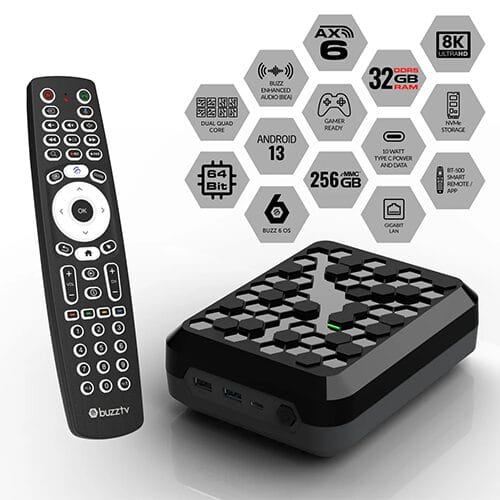
The BuzzTV PowerStation 6 comes in three different variations. The new Unlimited model comes with 32GB of DDR5 RAM and 256GB internal storage whereas the base models come with either 8GB or 16GB DDR4 RAM and 128GB internal storage. I’m using the Unlimited model in this review.
TROYPOINT Tip: Save yourself some money! If you aren’t a gamer, the 16GB and 32GB units are overkill! The 8GB unit is best for those who will only use the BuzzTV PowerStation 6 for streaming.
BuzzTV PowerStation 6 Order Links
BuzzTV PowerStation 6 UnLimited – $499.99
BuzzTV PowerStation 6 16GB RAM – $379.99
BuzzTV PowerStation 6 8GB RAM – $289.99
Use coupon code “TROYPOINT” for 10% off
Below, I will cover the features that are important to TROYPOINT fans.
The BuzzTV Powerstation 6 Unlimited scored a whopping 677,763 Antutu Benchmark score!
AnTuTu Benchmark measures the performance of Android devices by testing their CPU, GPU, memory, and user experience. It assigns an overall score to each device based on these tests, providing a way to compare the performance.

The NVIDIA SHIELD TV Pro has been one of the leaders in benchmark scores and is considered to be one of the most powerful streaming devices on the market. The BuzzTV PowerStation 6 blows the SHIELD out of the water!
Your online activity is monitored by your ISP, app/addon/IPTV devs, government, and all websites.
🔒 Become anonymous while streaming & downloading with Surfshark VPN
Save 87% with 24-Month Plan + Get 3 FREE Months
Use on Unlimited Devices & Share 1 Account with Entire Family
CLAIM DEAL HERE
To put this into context, the NVIDIA SHIELD TV Pro has an Antutu Benchmark of approximately 254,000, which is 423,763 less than the PowerStation 6.
The reason for the strong benchmark score above is due to the incredible internal specs that the BuzzTV PowerStation comes with. The two most important components that provide this exceptional performance are the CPU and RAM.
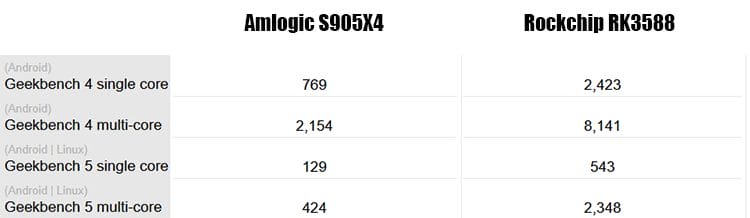
The BuzzTV PowerStation 6 comes with the Rockchip RK3588 CPU. When comparing this CPU to the Amlogic S905X4 in the popular Onn 4K Pro Android TV Box, it’s no contest. According to GadgetVersus, here are the Geekbench scores for each CPU.
Most budget-friendly streaming devices come with 2-4GB or RAM but the BuzzTV PowerStation 6 comes with 32GB, 16GB, or 8GB.
BuzzTV describes 64-Bit processing as “Future-proof performance tackles even the most demanding applications with ease.” There are some Android-based devices that are capable of 64-Bit processing but don’t take advantage of it.
I’m happy to report that the BuzzTV PowerStation 6 does support 64-bit applications. I installed the 64-bit versions of Kodi and Stremio on the device and they worked exceptionally well.
Speaking of Kodi, this s one area where the PowerStation 6 truly shines. Let’s face it, Kodi is a resource hog and this device can handle everything you throw at it through Kodi. You can now run heavy Kodi Builds and addons without dealing with a sluggish system.
The PowerStation 6 is running Android 13 and uses a mixture of both Android TV and Android Open Source Project (AOSP). There aren’t a lot of feature improvements to report when using a newer version of Android on a streaming device. Phones, yes, but not a big deal when it comes to a streaming box.
I like what BuzzTV has done with this operating system. For the most part, it’s Android TV but there are some settings incorporated that aren’t found in standard Android TV/Google TV devices.
Google Play is based off of Android TV which is a good thing in my opinion as they serve up apps that are compatible with a TV. You can always side-load other apps that you may need.
You will see that there is a new user interface that comes with BuzzTV 6 OS.
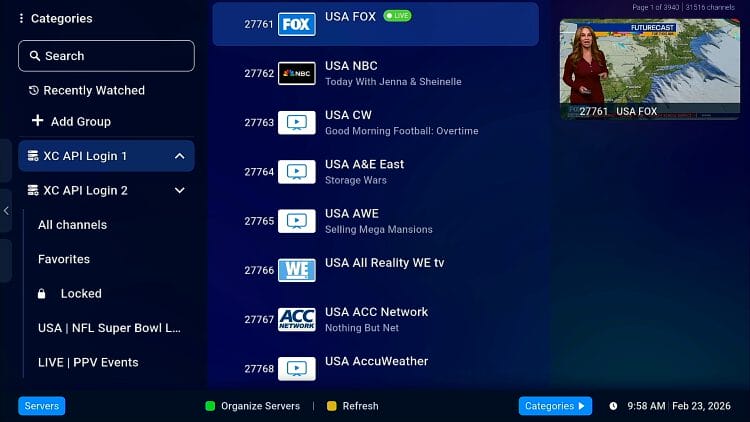
The integrated BuzzTV 6 IPTV app works well and allows for recording, rewinding/fast forwarding live TV, group creation, and much more. The more you use it, the more you will like it.
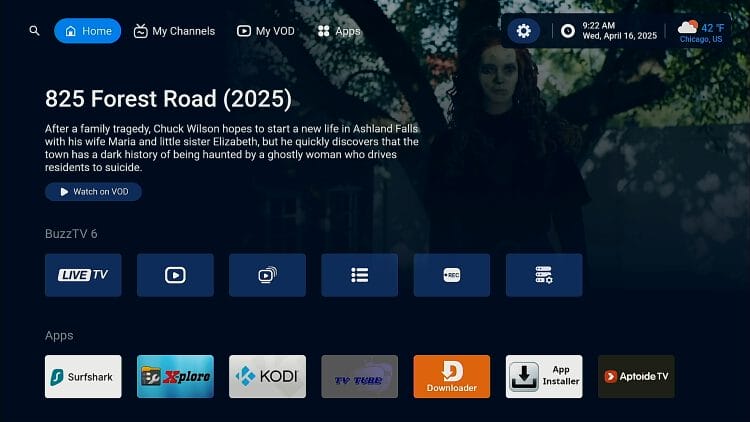
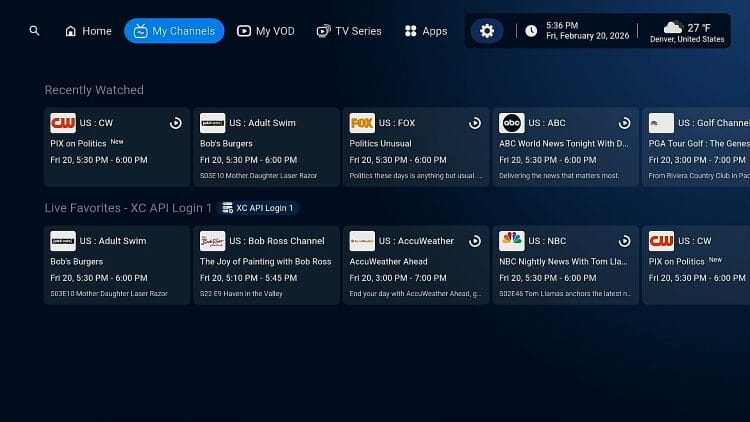
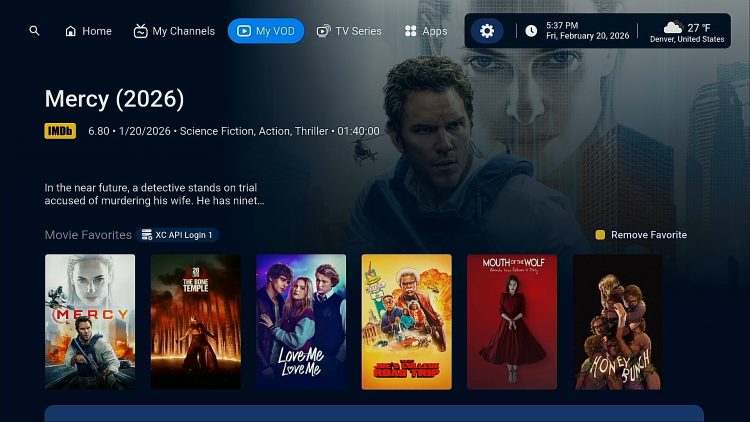
I really like how they incorporate their IPTV app, BuzzTV 6 into the launcher. You will see featured menu items such as My Channels and My VOD and this is where the items that you’ve added as favorites will appear. You can launch your favorite channels and movies directly from the main user interface.
A recent update now allows for quick access to multiple IPTV providers in BuzzTV 6 IPTV app.
There’s definitely some area for improvement with the launcher though. I would like to have the ability to create new categories on the Home screen. I would also like to see another menu item at the top for My TV Shows since My VOD only shows movies that have been marked as favorites. Or, take everything that’s included in those additional menu items at the top and add them to the Home screen. I think there is a lot of area for improvement with how the launcher could be customized by the user.
Update: My biggest complaint in the past regarding the BuzzTV PowerStation 6 was the lack of features within their launcher.
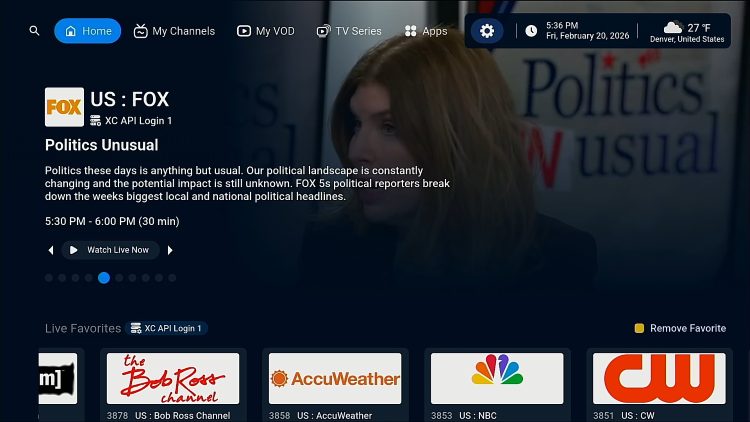
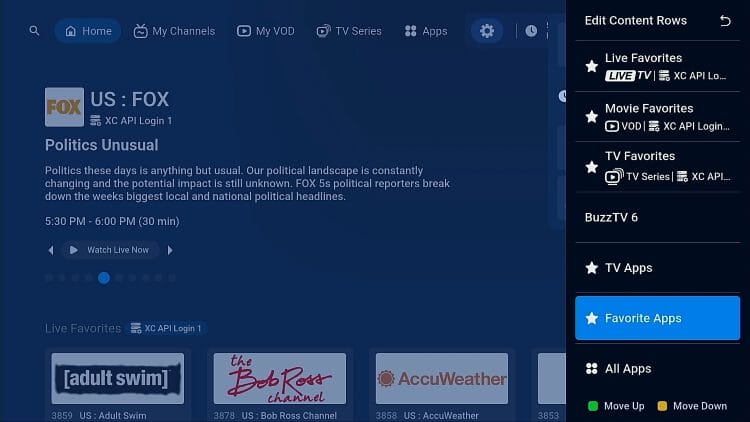
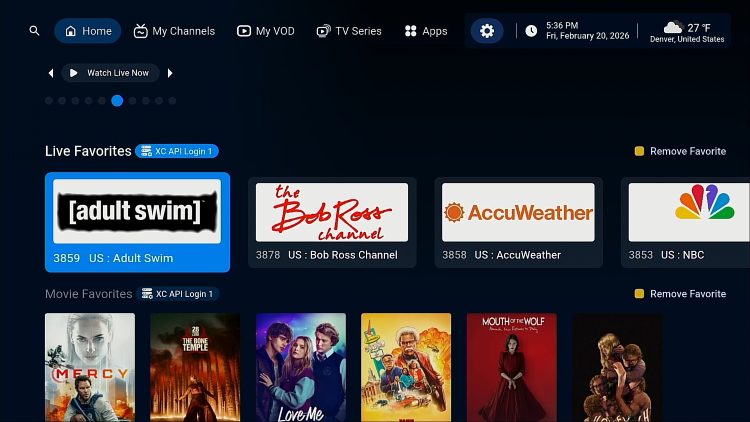
As of February, 2026 users can now customize the launcher to their liking and showcase their favorite IPTV movies, TV shows, and live TV directly on their home page! This allows for quick one-click access to their favorite content within their IPTV service. In my opinion, this feature truly sets BuzzTV apart from the competition in the Android TV Box market.
TROYPOINT Patrons can see this launcher in action in new video linked below.
INCREDIBLE New Features Added to the Most Powerful Android TV Box!
Here are some screenshots that show the power of this new launcher!
Home screen with recently watched carousel at the top along with live TV channel, movies and TV show favorites.
Custom options to build the launcher of your dreams which integrates with the BuzzTV built-in IPTV application.
Easily access your favorite IPTV on-demand movies and TV shows with 1 click right from your home screen.
My Channels section.
My VOD (movies) screen.
TV Series Favorites section.

During my review, I tested both TiviMate and Sparkle TV and they both performed as they should. Unfortunately, when you use 3rd party IPTV apps, they don’t integrate with the BuzzTV PowerStation 6 launcher. If you’re going to use this device, I strongly suggest using the built-in BuzzTV 6 IPTV application.
I’m happy to report that the BuzzTV PowerStation 6 does support 3rd party launchers. I setup my favorite which is Projectivy and it’s extremely snappy on this Android TV Box.
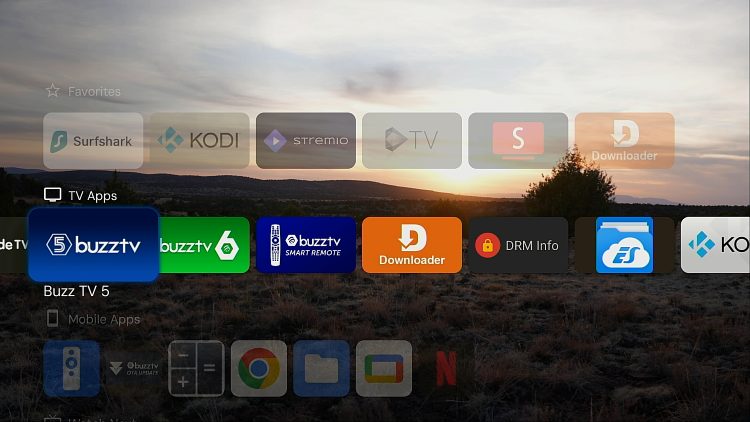
The PowerStation 6 includes a utilities section specifically designed for this device.

I really like the Network Shares feature because it allows me to see the Android folders and files on the system. I can easily transfer files back and forth to any device. If I want to send an APK or movie file from my computer to the PowerStation 6, no problem!
The PowerStation 6 does come with Netflix and Prime Video applications but don’t get too excited. Since this box isn’t certified and doesn’t carry the proper licenses, we don’t get the true Android TV apps for these services.
If you’re a heavy Netflix or Prime Video user, I wouldn’t suggest purchasing the BuzzTV PowerStation 6 or any non-certified device for that matter.
TROYPOINT no longer deducts points for not supporting these apps as there shouldn’t be a reason for them if you’re using popular APKs and/or Kodi Addons.
If you do have family members who want to use Netflix, we suggest setting that service up directly through your TV. Most newer televisions come with both Netflix and Amazon Prime apps and users can simply switch to those if that want to use those services.
There are a few streaming devices on the market that come with video up-scaling but for some reason the PowerStation 6 doesn’t. If you’re already viewing 4K content, there’s nothing to upscale so this feature might not be a big deal depending on your circumstance.
In my testing, picture quality exceeds expectations even for 1080p and 720p streams.
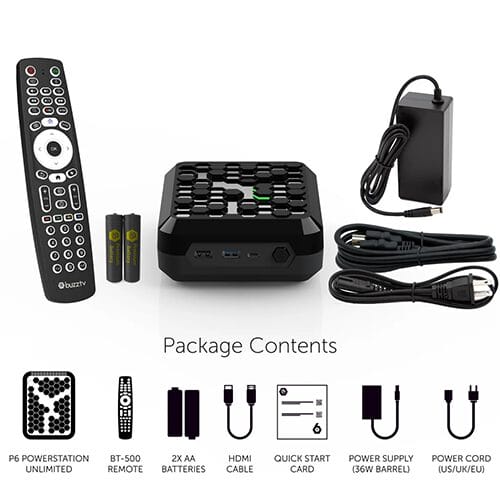
An important piece to any Android TV box is the remote control. The PowerStation 6 comes with the BT-500 Voice Remote and a dedicated app that allows for customization of some buttons.
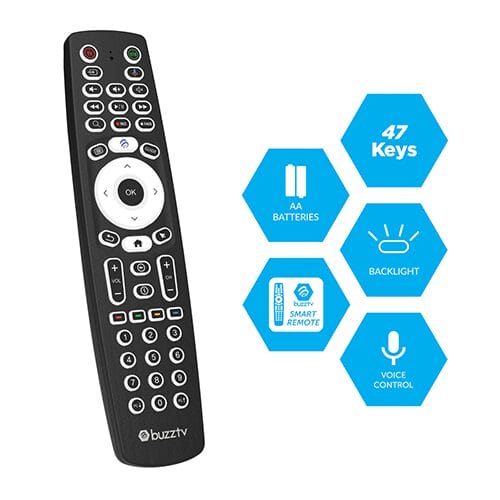
The build quality of this remote is excellent and feels great in my hand. It includes all kinds of different shortcuts for the BuzzTV 6 IPTV application such as Guide, Record, Channel Up/Down, Search, Rewind, Fast Forward, Play/Pause, Information, and more.
It includes a mouse toggle so you can navigate apps that aren’t TV friendly. For me, this comes in handy when using my security camera apps as those aren’t available for Android TV.
The BT-500 PDF manual includes instruction for pairing the remote with your TV so you can power it on/off and control the volume. It also shows how to enable the backlight on the remote control and offers other important guidance as well.
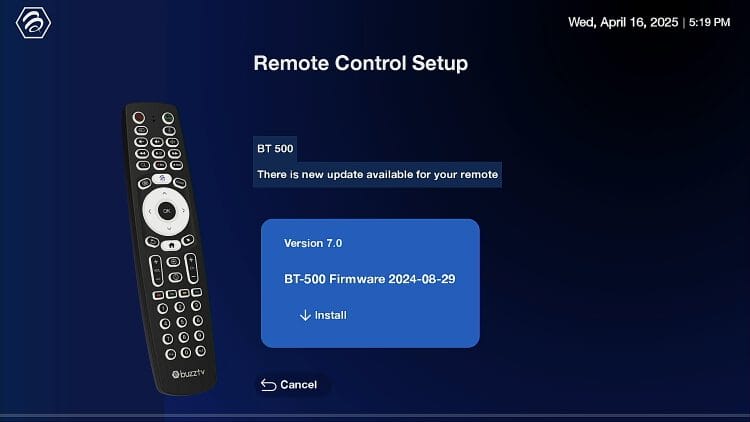
The BuzzTV Smart Remote app allows you to update the remote firmware, turn on/off backlight, set max volume, pair Bluetooth remote, auto TV setup, and configure color keys. You can assign the color keys on the remote to open a specific application!
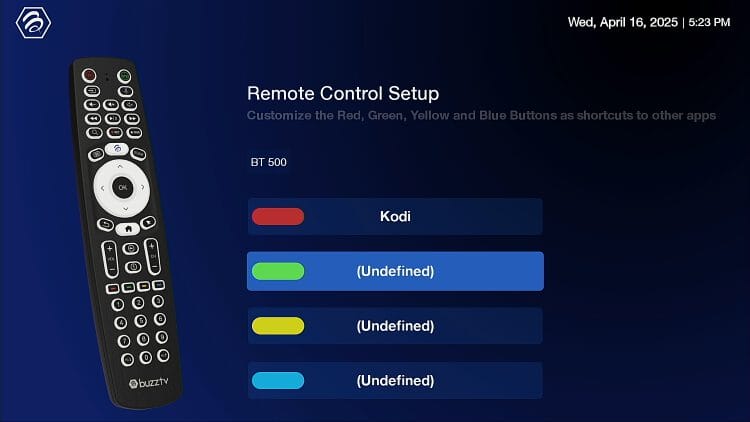
All-in-all it’s a great Bluetooth remote control and I’ve had no problems with it whatsoever.
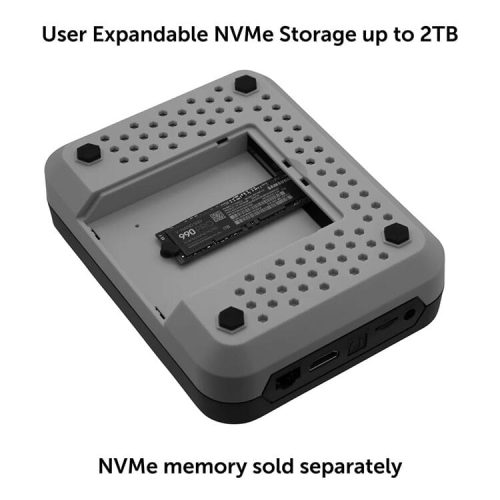
The BuzzTV PowerStation 6 also supports adding additional storage up to 2TB through NVMe SSD. I’m not sure that additional storage is necessary due to the fact that it already comes with either 128GB or 256GB but it’s there if you need it.
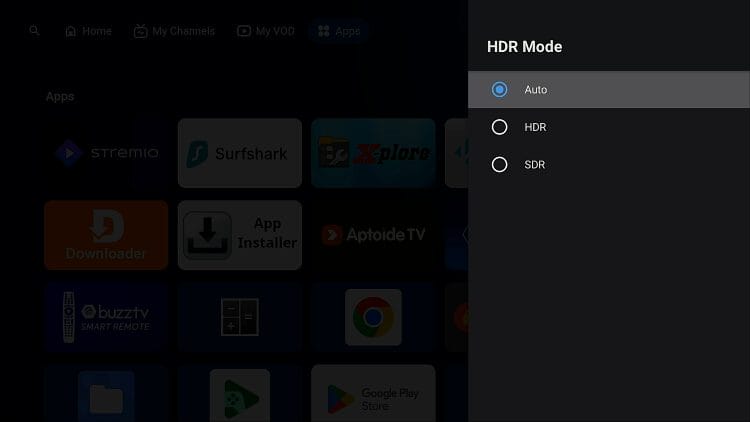
Most Android TV boxes don’t allow you to adjust color settings such as Brightness, Contrast, Saturation, and Tone. You’re expected to do all of that directly through your television.
The PowerStation 6 includes a setting for that!

You can choose among Auto, HDR, and SDR. If you choose HDR, you then have the ability to choose Vivid Max Brightness of 1200, 1000, 500, or 800.
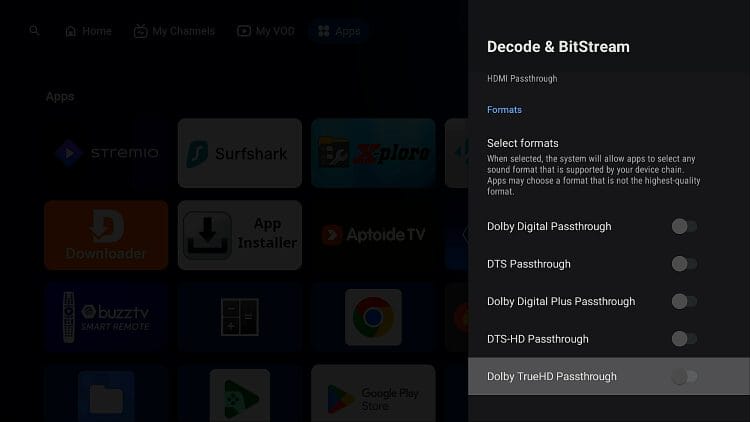
You can choose auto or manually select the audio format you would like to enable within settings that your TV supports.

The following download/upload tests were done with the BuzzTV PowerStation 6 Unlimited being connected to my ASUS RT-AX86U WiFi 6 Router. I’m using Surfshark for the VPN tests.
Gigabit Speeds
VPN Off: 910 Mbps Download & 679 Mbps Upload
VPN On: 456 Mbps Download & 257 Mbps Upload
WiFi Speeds
VPN Off: 682 Mbps Download & 282 Mbps Upload
VPN On: 364 Mbps Download & 195 Mbps Upload
This test was done on the same router as above measurements (ASUS RT-AX86U WiFi 6 Router) with Surfshark VPN integrated.
Gigabit Speeds: 833 Mbps Download & 419 Mbps Upload
WiFi Speeds: 297 Mbps Download & 156 Mbps Upload
Here’s a video that shows how to run a VPN off router for whole-home protection with blazing fast download/upload speeds. This is the same setup that I used in the VPN router speed test.
Best WireGuard VPN Router Setup Video
BuzzTV PowerStation 6 Order Links
BuzzTV PowerStation 6 UnLimited – $499.99
BuzzTV PowerStation 6 16GB RAM – $379.99
BuzzTV PowerStation 6 8GB RAM – $289.99
Use coupon code “TROYPOINT” for 10% off
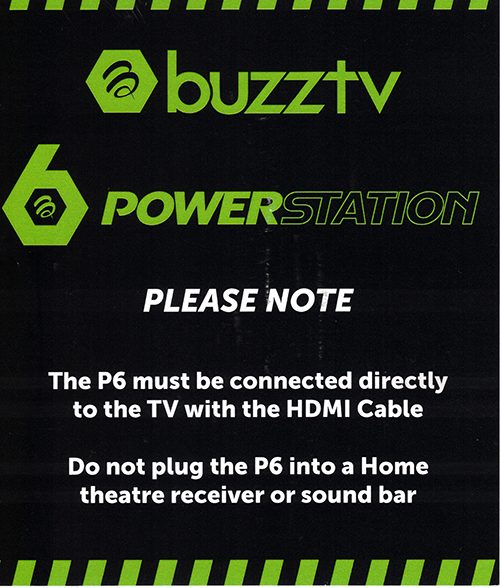
The following note was also included in the box. I reached out to BuzzTV about the insert and this was their explanation.
They want people to first connect the box directly to the TV to avoid any HDMI issues, etc. Once initial setup is complete and the customer knows things are working properly, they can proceed to connecting to receivers, etc. Also, they don’t recommend using HDMI ARC.
I connected the BuzzTV PowerStation 6 to my surround sound receiver after initial setup and everything worked great.
BuzzTV is one of few off-brand Android TV manufacturers that pushes out numerous updates that fixes bugs and adds new features. Not only do they offer updates for the box itself but as you can see in the image below, you can get them for the remote control too!
BuzzTV PowerStation 6 UnLimited – $499.99
BuzzTV PowerStation 6 16GB RAM – $379.99
BuzzTV PowerStation 6 8GB RAM – $289.99
Use coupon code “TROYPOINT” for 10% off
This box is a powerhouse and I find myself using this on a regular basis as compared to any other device. Everything loads faster and screen transitions are quick.
Due to the power packed in the BuzzTV PowerStation 6, this should be the best future-proof streaming devices that one could buy. We saw how long the NVIDIA SHIELD has held the crown as one of the best Android TV boxes and this blows that out of the water in terms of power. BuzzTV does a nice job of keeping their devices updated and the specs on this thing will be relevant for a very long time.
Also, Google has been hinting of cracking down on side-loading apps in the future but this box will be unharmed due to being built from Android Open Source Project (AOSP). It’s not a Google certified device so we won’t see any lockdowns on this.
I mentioned this before but it’s important to point out that the PowerStation 6 is not meant for people who use Netflix or Amazon Prime Video. This was designed for those of us who use IPTV, Kodi, Stremio, Syncler, and other free streaming APKs.
In this review, I was using the Unlimited model and I don’t think that’s necessary for most people. Using the standard 8GB BuzzTV PowerStation 6 will still provide big-time performance and 128GB of internal storage. Not sure why anyone would need more storage than that on a streaming device.
The biggest question is whether this is overkill for a streaming device. Some people want the very best and I would say that the BuzzTV PowerStation 6 offers that.
One of the features that I like the most is how their launcher integrates with their IPTV app. It’s nice being able to launch your favorite TV channels, shows, or movies directly from the launcher. Their latest launcher update truly sets this Android TV box apart from its competitors.
My rating for the BuzzTV PowerStation 6 is 4.9 out of 5 stars.
BuzzTV PowerStation 6 Order Links
BuzzTV PowerStation 6 UnLimited – $499.99
BuzzTV PowerStation 6 16GB RAM – $379.99
BuzzTV PowerStation 6 8GB RAM – $289.99
Use coupon code “TROYPOINT” for 10% off
Here’s a quote from Miki who is a leader on the TROYPOINT Insider and trusted within the cord-cutting community.
I have been holding back and waiting for Troy to put this vid out. This is by far the fastest, smoothest and robust streaming device I’ve ever owned. Easy setup and tons of room. I added external storage via the 3.0 USB port.
This is a 64 bit OS but I haven’t found one 32 bit app that hasn’t worked and worked flawlessly. The BuzzPowerstation Unlimited is an Android TV box I didn’t use the onboard iptv stuff but added TiVimate. Haven’t found any specific 64Bit apps I might need, but from my reading they are supposedly more secure. I used TiVimate because I am very comfortable with it. I should add a sub to the internal iptv and see how it works. Maybe in the future. Yes this is overkill for a streamer and has 256GBs internal and 32 GBs RAM.
Yes the price is crazy hi but then if I count up all the money I’ve spent on devices then this is a drop in the bucket. I have used this for a week now and done a little extra tweaking since I first fired it up. I will say this is AndroidTV 13 and the System Picker is fully functional. I had no problem setting up recording to either internal or external and recorded an entire week of the Wife’s favourite soap. No missed recordings, and all played perfectly. There are a bunch of startup vids and a full remote key map. As usual enable the Dev options. My only small problem is, it is lacking in settings. Nowhere near the options compared to the SK1. Going to try my internal LAN server next.
This is absolutely my favourite device now. Hopefully it will last me for years to come.
This page includes affiliate links where TROYPOINT may receive a commission at no extra cost to you. Many times, visitors will receive a discount due to the special arrangements made for our fans. Learn more on my Affiliate Disclaimer page.



© IPTVSub is Proudly Owned by win-design